This article covers iOS 17, Apple’s 2023 iPhone software update. For the models that supported iOS 17, see our iOS 17 compatibility guide.
Summary
iOS 17 added Live Voicemail, Contact Posters, and interactive widgets. It also brought StandBy and offline Apple Maps. Later releases added NameDrop, Journal, and shared Apple Music playlists. Personal Voice is an accessibility feature. This guide covers iOS 17 software, not the iPhone 17 device.
1. StandBy: A Charging Display
StandBy shows a full-screen view when an iPhone is charging on its side. You can use it for a clock, small app boxes called widgets, Live Activities (updates such as a timer), or photos. Siri can show some results, such as a timer, in a compact view.
2. Contact Posters
Choose a photo, Memoji, text style, and color for your Contact Poster. Callers see it when you call. It changes how your call appears on their phone. It does not create shared company contact records.
3. Live Voicemail: Screen Calls with a Transcript
Live Voicemail shows the message as text while the caller is leaving it, so you can decide whether to answer. Availability and behavior can vary by region, carrier, and device settings.
4. Improved Autocorrect
iOS 17 improved autocorrection and added word suggestions that appear as you type. The keyboard can use context to suggest corrections.
5. Interactive Widgets
iOS 17 made some widgets interactive. For example, a Reminders widget can let you mark a task complete without opening the app. Which actions are available depends on the app.
6. NameDrop: Share Contact Details
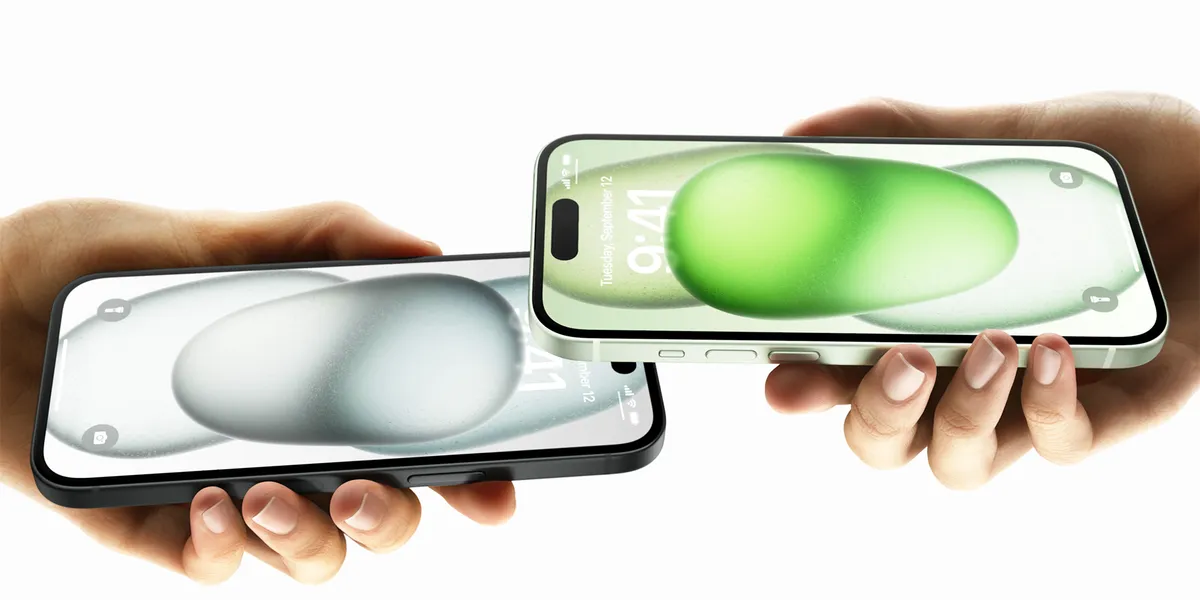
Apple added NameDrop in iOS 17.1. Bring two supported devices together. You can share your contact card or receive the other person’s details. Choose which contact fields to send.
7. Offline Apple Maps
iOS 17 lets you download an area in Apple Maps for offline use. This can help in places with weak or no service. Map details and features may be limited offline.
8. Journal App
Apple released Journal with iOS 17.2 in December 2023. Suggestions on your device can use photos, music, or workouts to remind you to write an entry. Journal is for personal writing, not business task management. See Apple’s launch note.
9. Personal Voice for Accessibility
Personal Voice makes a digital copy of someone’s voice for accessibility. Live Speech can read typed text aloud during calls or face to face. Apple says the creator can use this voice for personal purposes only. It is not for business voiceovers. See Apple Support’s explanation of Personal Voice.
10. Enhanced Sharing and Collaboration
iOS 17.3 added collaborative Apple Music playlists. Invited subscribers can add, reorder, or remove songs. The feature arrived after the September 2023 release. See Apple’s iOS 17 update notes. For iPad, see our iPadOS 17 features guide and our Apple for entrepreneurs guide.
Our Recommended Accessory: Apple AirTag


This post recommends an Apple AirTag for tracking tagged items. Product prices, compatibility, and availability can change. Check Apple’s current information before buying.
One customer wrote, “The Apple AirTag is a testament to Apple’s commitment to quality and innovation. With the Find My app on your iPhone, you can pinpoint the exact location of your tagged items, thanks to the U1 chip’s ultra-wideband technology. This level of precision is unmatched by any other tracking devices on the market.”
Another customer wrote, “The AirTag’s design is a masterclass in Apple’s signature simplicity and elegance. Its compact, coin-like form is both discreet and practical, blending seamlessly into your daily routine. The stainless steel back adds a touch of durability and luxury, reflecting Apple’s meticulous attention to detail.”
FAQ
What communication features did iOS 17 add?
iOS 17 introduced Contact Posters and Live Voicemail. NameDrop arrived in iOS 17.1. Bring two supported devices close together to share selected contact details.
What does StandBy do in iOS 17?
StandBy shows a clock, widgets, Live Activities, or photos when an iPhone is charging on its side.
What changed in autocorrect?
iOS 17 added inline predictive text and improved autocorrection. The keyboard can suggest words as you type.
How does Live Voicemail work?
Live Voicemail displays a transcription while a caller leaves a message. You can use the text to decide whether to answer the call.
What can interactive widgets do in iOS 17?
Some widgets let you take an action without opening the app. For example, a Reminders widget can let you mark a task complete. Available actions depend on the app.
Further Reading Resources
For more on iOS 17 features for entrepreneurs and businesses, see these resources:
- Apple’s Official iOS 17 Features Guide: iOS All New Features PDF
- Apple’s Newsroom on iOS 17: iOS 17 is Available Today
- MacRumors’ Comprehensive Feature List: iOS 17 Launching Tomorrow: Feature List
- YouTube Overview of iOS 17: Watch Video
- Entrepreneur’s Take on iOS 17: Customers Furious as Apple Quietly Changes the End Call
- CNBC’s Announcement on iOS 17: Apple Announces iOS 17 Release Date
- Ideamotive’s iOS Guide: Ideamotive iOS Guide
- TechCrunch’s Coverage: TechCrunch on iOS 17
- PCMag’s Review: Apple iOS 17 Review
- 9to5Mac on New Features and Release Date: iOS 17: New Features, Release Date, Beta, and More
These links provide more detail on the features and updates listed above.