Summary
I used StoreShot to build App Store screenshot galleries for five BeatS iOS editions. Fastlane Snapshot still captures my screens in the simulator. StoreShot lets me change each image’s caption, color, and frame, then reuse the project after an app update. I prefer StoreShot, though I haven’t measured whether the screenshots changed downloads.
Introduction
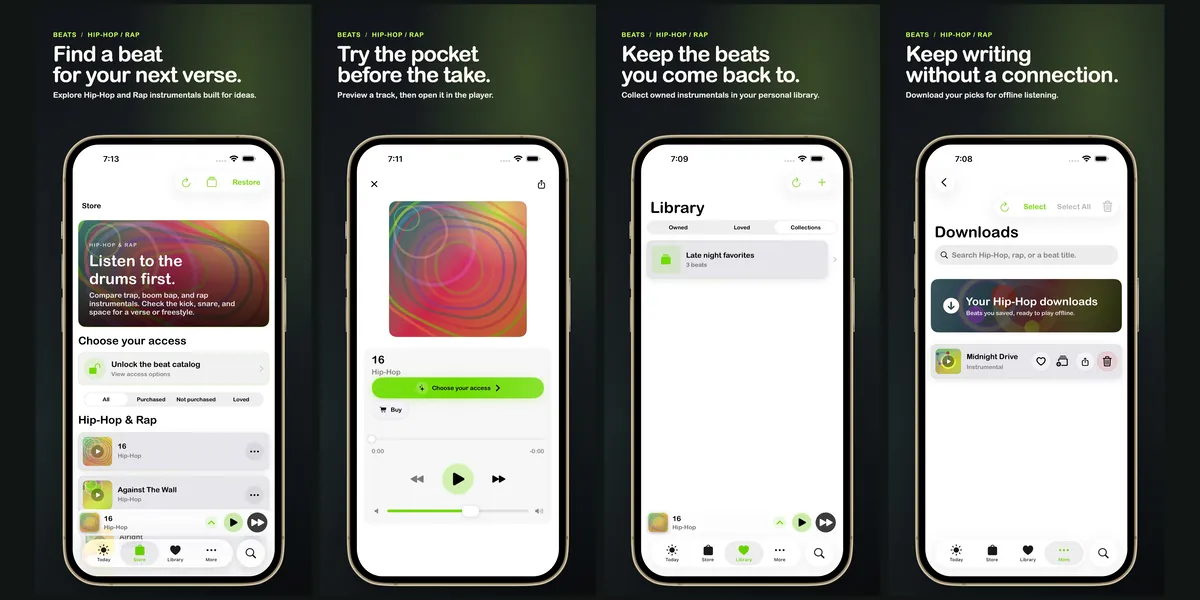
In early November, I made screenshot sets for five BeatS iOS editions with StoreShot. Each set has four iPhone images and four iPad images. I used the same order in every gallery. Then I changed the captions and accent colors to fit each music catalog.
Five BeatS galleries
Each gallery uses four screens: browse, preview a beat, save it, then listen offline. The order stays the same across all five editions:
- BeatS Hip-Hop/Rap Edition puts verses and drums first, with a green accent.
- BeatS Afropop Edition brings in amapiano and the log-drum pocket, with a violet accent.
- BeatS Reggaeton Edition leads with dembow and an amber accent.
- BeatS Christmas Edition focuses on holiday edits, with a coral accent.
- BeatS R&B/Soul Edition is the App Store name for the R&B/Pop set. Its captions bring chords and melody forward, with cyan.
Fastlane still handles the captures
Fastlane Snapshot was the only tool I used to automate iOS screenshots. I still use it to capture app screens in the simulator. After capture, I choose the order and write the captions. I also pick a device frame for each image.
I love both screenshot tools, but I prefer StoreShot. I can adjust the color, caption, and frame for each screen. The gallery feels more dynamic than what I made with Fastlane Snapshot alone.
StoreShot gives me more control per image
The StoreShot skill keeps each project in HTML and CSS files for its layout and style. The artwork stays in image files. I can change the captions, colors, and frames, then preview the design before I export. The preview lets me check that the artwork does not hide the app itself.
I can review one image or the full gallery. When the app changes, I can replace the captures, update the captions, and export again. I keep the screen order and frame layout, then tailor the details for each music catalog.
I used the same approach for Font Wizard Pro. Tests that step through the app captured seven iPhone screens and three iPad screens. The artwork uses Arial Rounded. The StoreShot project includes a refresh script. I can use it to replace the captures and export a new set without rebuilding the layout.
App Store Screenshots lets me see the whole strip
The App Store Screenshots skill uses a connected canvas. It shows each gallery image beside the others. I can carry a background or design element across the row, but each panel still exports as its own image.
I like that view when I’m planning the full strip. StoreShot gives me more room to shape each image. I used the same order and layout for the BeatS galleries. Then I changed the captions and colors to fit each genre.
I can update both galleries later
Both projects stay editable after export. I can change a layout or caption and export again. The project keeps the captures, fonts, artwork, and settings together. That lets me recreate the same gallery for an app update. Both workflows are dynamic and reproducible.
I still check every export. A different font or browser can change how an image looks. An app update can change the screens, too. I check that the copy reads, the device frame fits, and every image shows the current app. I also check the size and file type against Apple’s screenshot requirements.
I haven’t measured whether these screenshots changed downloads. I prefer StoreShot because I can adjust each gallery and reuse its project for the next update.